
Solar-Powered LTE Video Camera
HD video, intelligent event detection and live remote access — from sites with no mains power and no broadband. A self-contained unit that runs day and night on battery, kept charged by its own solar panel and connected over the mobile network.
A Genuine First for the Industry
Until now, a camera on a remote, off-grid site meant a compromise: the occasional still image, sent hours apart, in whatever quality a small solar battery could afford.
We set out to remove that compromise entirely. The result is true HD video and razor-sharp stills — day or night — from a unit that needs no mains power and no fixed line. Two years of research and development have gone into making that possible in a package you can mount on a post and walk away from.
See It Day or Night
Daytime — a full HD 1080p still through a professional IR-cut lens, for true, natural colour.
The same location at night — full HD 1080p clarity from our starlight low-light technology.
HD VIDEO, NOT JUST STILLS
HD video by day — 20-second clips in 720p, captured automatically the moment something enters the scene.
And after dark — the same smooth footage, sent straight to you over the mobile network.
AI WE BUILT OURSELVES
Most cameras rely on generic, off-the-shelf detection. We didn't want generic. Over 14 years we've gathered more than 10.4 million real images — from the Environment Agency, Network Rail, county councils and private operators — and used them to train our own AI to recognise exactly what it's looking at.
That's a dataset no one else has: real sites, real weather, the exact conditions these cameras face every day. It's why our detection is accurate where off-the-shelf systems fall short — and it can't be bought off the shelf or copied.
Not just "a car" or "a person" — our AI recognises site-specific conditions like spilled sandbag material or displaced concrete on the track, the kind of detail only years of real infrastructure imagery can teach it to see.
IT DOESN'T JUST WATCH — IT ACTS
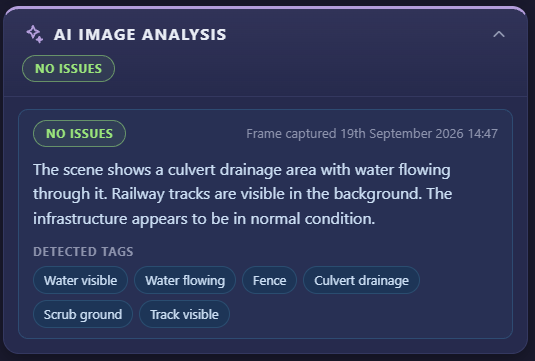
Trained on 14 years of real-world imagery, the camera recognises what matters at your site — rising flood water, debris building against a trash screen, or movement where there shouldn't be any.
The moment it detects something, it acts on its own: sending an automatic email alert with the video attached, and pushing the same footage straight to your smartphone app. No one has to be watching a screen for the warning to arrive.
From debris building on a trash screen to a ladder left by the line, it flags the hazards that matter — and the moment it spots one, the alert goes out automatically.
PRIVACY, BUILT IN
The same AI that spots what matters also protects the people it sees. Faces and vehicle number plates are detected and blurred automatically, before the footage ever reaches you — no manual editing, no personal data left exposed.
It means you can monitor public spaces and roadsides while keeping personal data protected — compliance built in from the start, not bolted on afterwards.
A busy platform — every face blurred automatically, while the AI detects and classifies each person in the scene (green).
The same location moments later — here the AI has also picked out a bicycle (orange), telling different object types apart, with every face still blurred.
BRITISH-BUILT AND BRITISH-CONTROLLED
The LTE Video Camera is designed, built and controlled by Vision Link, a British company. Every unit runs only our own software and reports only to our own systems — never to a third-party surveillance platform. All images and data are processed and held on infrastructure we operate, under UK and EU law, and are never sent to, stored in, or accessible from the People's Republic of China. Faces and number plates are blurred automatically as part of that processing.
This is what keeps our equipment clear of the restrictions the UK Government placed on foreign-controlled surveillance systems — in its Security Update on Surveillance Equipment (24 November 2022) and the national-security provisions of the Procurement Act 2023 — which apply to equipment produced by manufacturers subject to the National Intelligence Law of the People's Republic of China. Our full position is set out in our Surveillance Equipment Compliance Statement (VL-CMP-001), available to procurement and security teams on request.
BUILT TO LOOK AFTER ITSELF
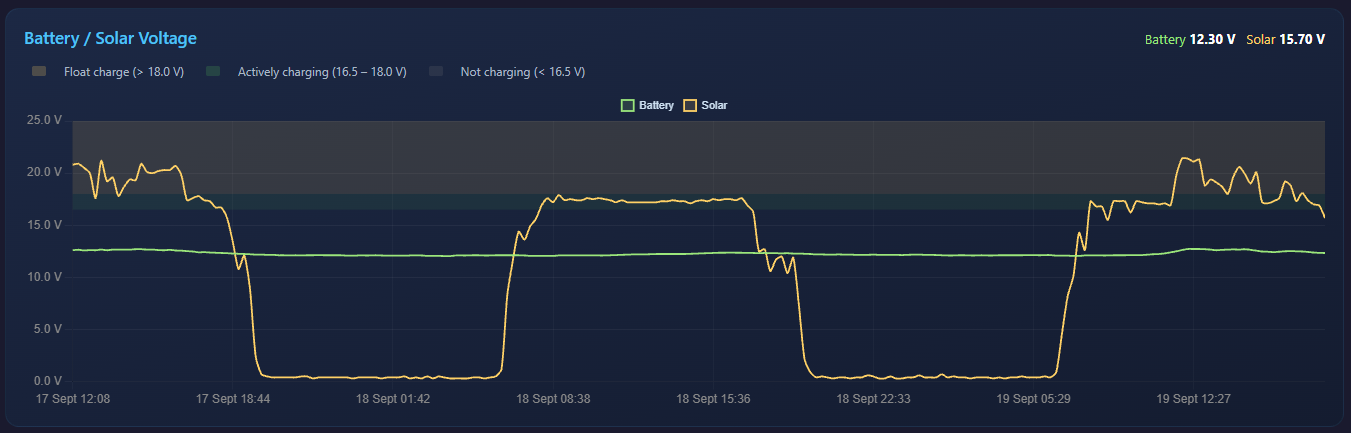
432 Wh of lithium power, kept topped up by its own solar panel — enough to run continuously, day and night, right through the darker months.
Always-connected 4G LTE. The camera automatically switches to whichever mobile network is strongest at your site, so it stays online even where a single-network SIM would drop out.
Updated over the air. New detection abilities and improvements arrive remotely — no site visit, no downtime, no ladder.
MORE THAN A CAMERA
The camera is only the beginning. It's the hub of a wider monitoring system that reaches well beyond what the lens can see.
A FloodEye camera does not only show you the site. It can also measure it.
Every camera has a sensor port. Connect a water level sensor, a rain gauge or a weather station directly to it and the camera reads that sensor, watches it for alarm conditions and sends the readings back with the pictures. One unit, one power supply, one connection to look after.
That matters on a flood site. The picture tells you what the water is doing. The sensor tells you exactly how deep it is, how fast it is rising and how much rain brought it there. Together they are evidence, not just an impression.
One Cable, No Extra Box
The sensor plugs straight into the camera. There is no separate logger, no second enclosure and no second battery to maintain.
The camera supplies the sensor's power from its own supply.
The camera reads the sensor and stores the readings.
The readings travel to your portal on the camera's existing mobile connection.
Because the camera is already powered, already connected and already weather sealed, adding a sensor adds one cable and nothing else.
It Knows What You Have Plugged In
There is nothing to configure and no sensor type to select.
When the camera starts up it checks the sensor port, working through the sensors it supports until one answers. The camera's screen shows the search as it happens, names the sensor it found and then shows its first live reading, so the installer can confirm the sensor is working before leaving site.
Change the sensor later and the camera simply finds the new one at its next start. An installer does not need a laptop, a manual or a phone call.
Water Level Sensors
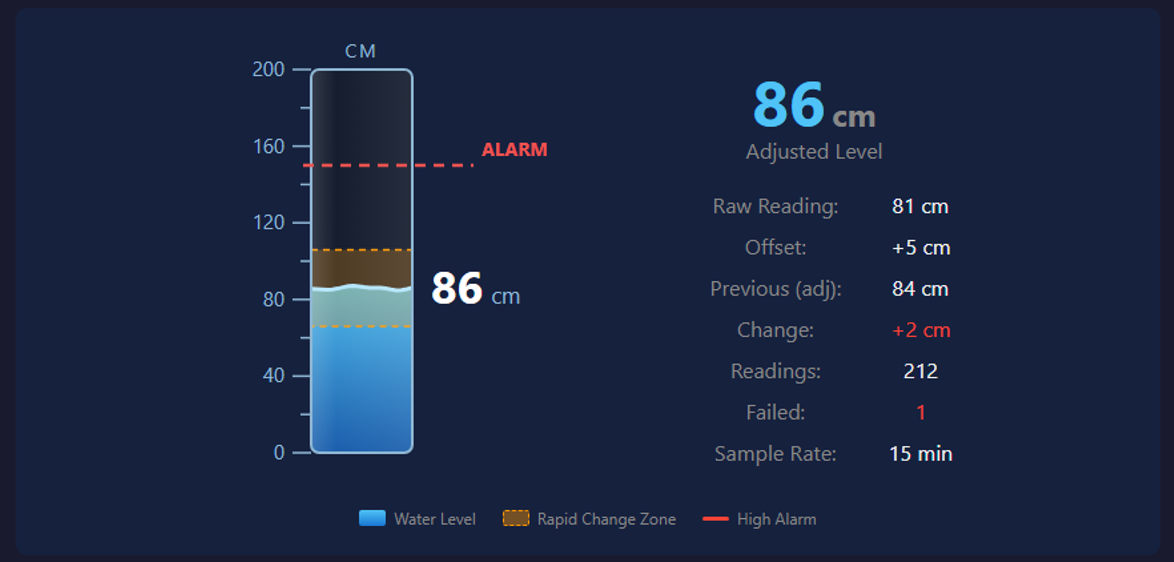
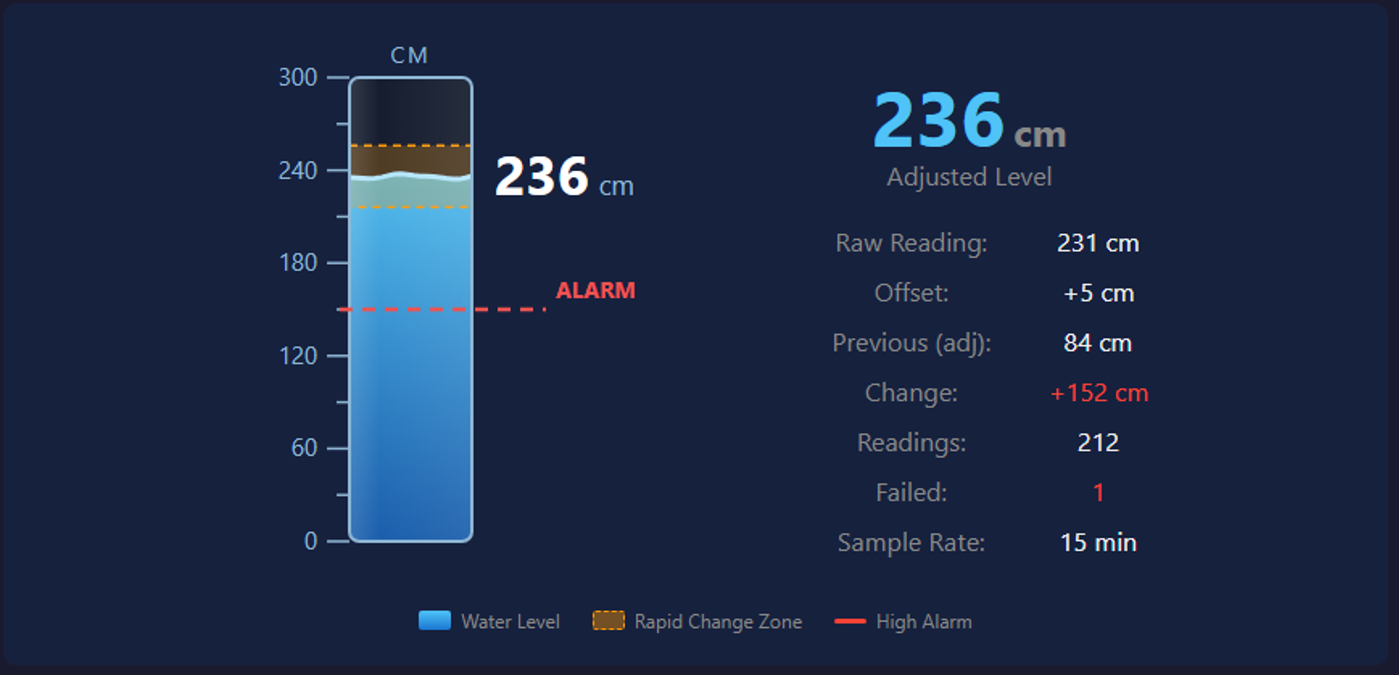
A water level sensor gives you the depth in millimetres, logged around the clock.
The camera does not simply pass on whatever number it reads. Each reading is built from several samples taken in quick succession, and obvious spikes are discarded. If the level appears to have jumped a long way since the last reading, the camera checks it again before accepting it. A reading that reaches your portal is one the camera is confident in.
Two alarms come as standard, and you set both:
High Level. The level has reached the depth you consider a problem.
Rapid Rise. The level has moved more than your chosen amount since the last reading. Water that climbs quickly is often the warning that matters most, and this catches it long before the high level alarm does.
Rain Gauges
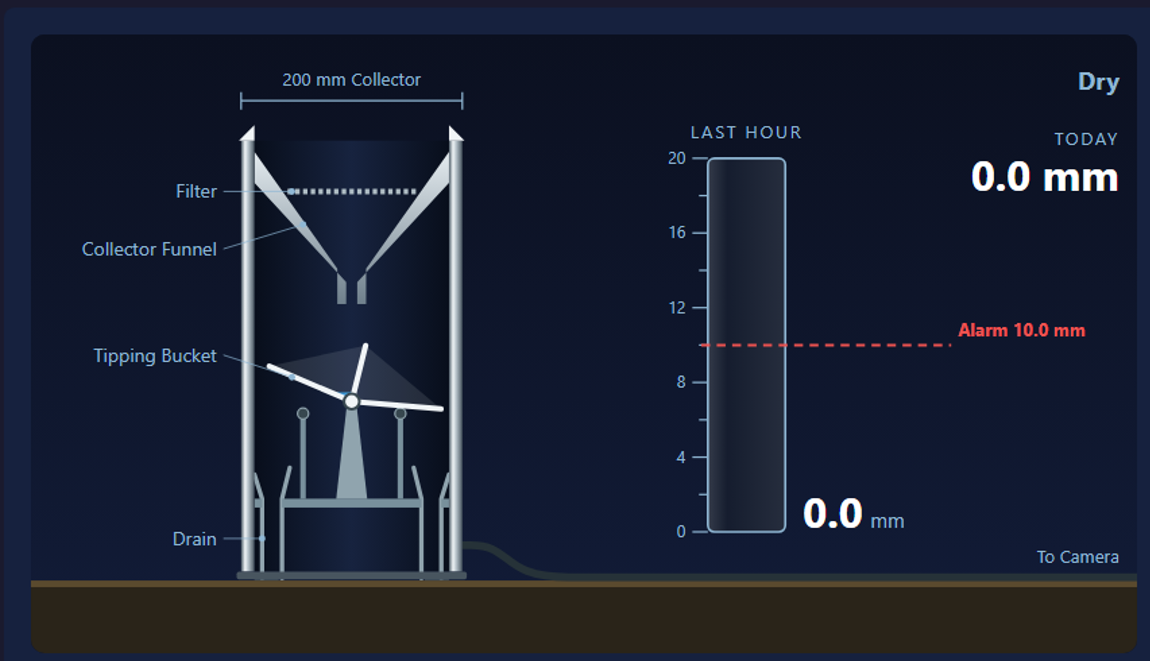
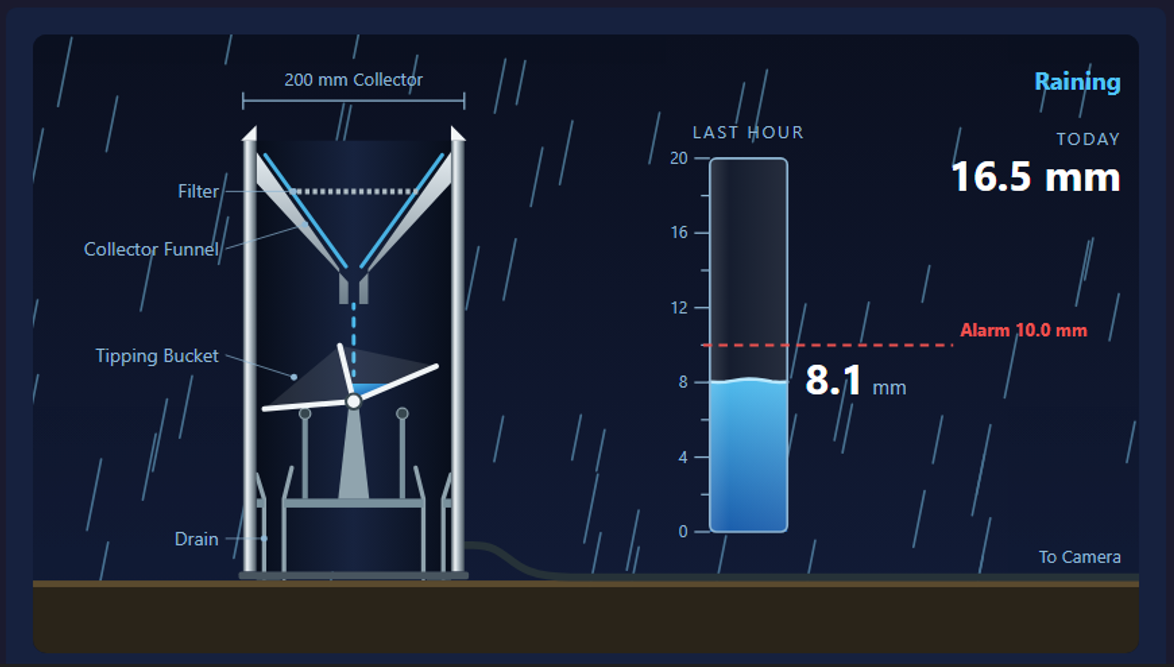
A tipping bucket rain gauge tells you how much rain has fallen and, just as importantly, how hard it is falling.
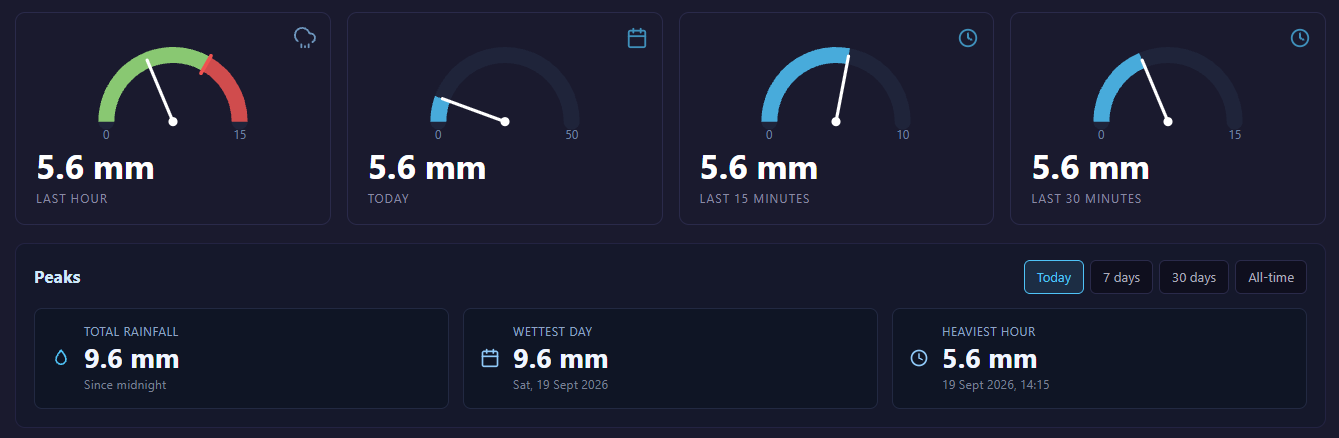
The camera keeps running totals for the last fifteen minutes, the last thirty minutes, the last hour and the day so far, all to a tenth of a millimetre. A heavy rainfall alarm watches the hourly figure against a level you set, so you are told about a cloudburst while it is happening rather than after it.
The camera keeps the gauge powered continuously. A gauge that loses power between readings stops counting, and the rain that falls in that gap is never recorded. Ours does not have that gap.
Screenshots From The Camera's Local Web Interface
A compact weather station turns the camera into a full monitoring point for the site, with seven readings from a single unit:
Wind speed
Wind direction
Weather Stations
Air temperature
Humidity
Barometric pressure
Fine particulates (PM2.5)
Coarse particulates (PM10)
Wind and air quality matter on working sites as much as rainfall does. The same readings that explain a flood also cover dust from site traffic, conditions for lifting operations and the falling pressure ahead of a storm.
Flow
A radar flow meter tells you how much water is moving through the channel, and which way.
It measures from above. Two radars look down at the water: one reads the distance to the surface, which gives the depth over the bed, and the other reads how fast the surface is moving. From the depth, the channel shape you set and the mean velocity, the meter works out the flow in cubic metres per second and keeps a running total of the volume that has passed.
Nothing goes in the water. There is no probe in the channel to foul, silt up or be swept away in the flood you installed it to measure, and nobody has to enter the water to fit it or service it. On a site where the channel is the hazard, that is the difference between a measurement you can maintain and one you cannot.
It also reads flow running backwards. Tidal reaches, surcharged outfalls and water backing up behind a blockage all show as reverse flow, with its own separate total, so a channel that reverses is recorded honestly rather than counted as more flow going the right way.
Meter – non-contact radar, nothing placed in the water
Flow rate – cubic metres per second, live
Velocity – surface velocity and cross-section mean
Direction – forward and reverse flow both measured
Level – water depth over the bed, from the same meter
Totals – forward and reverse volume
Channel shapes – rectangular, trapezoidal, circular and irregular
Commissioning – echo strength and mounting angle shown for both radars
Live Readings On Your Phone, On Site
Standing at the camera, you do not need signal, an app or a login.
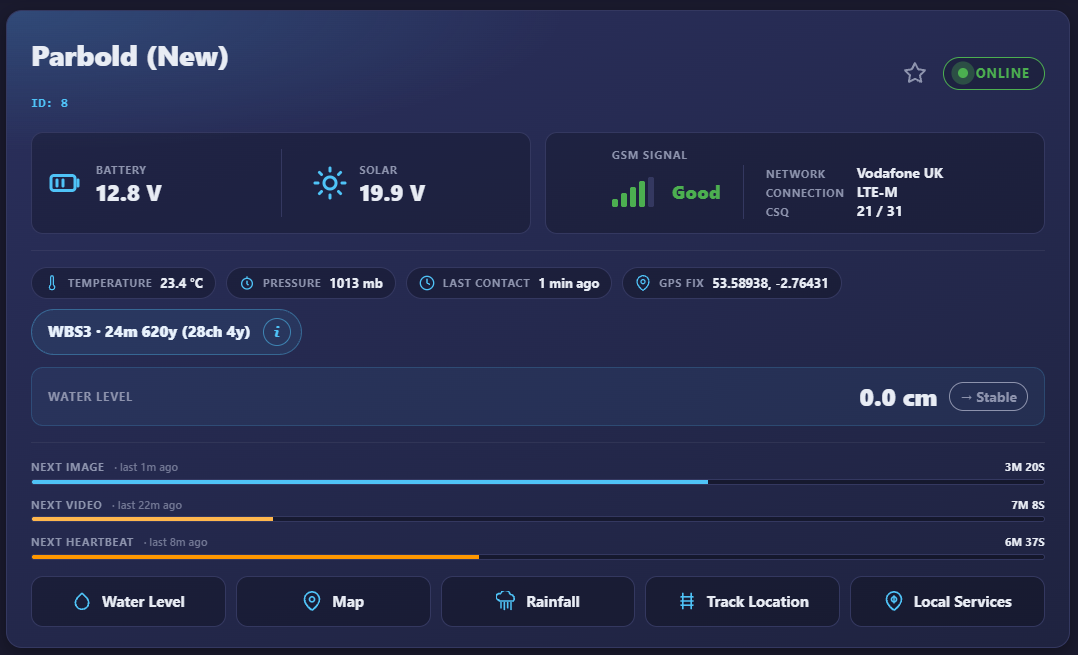
The camera creates its own wireless network. Scan the code on the camera's screen with your phone and you are connected; scan the second code and the camera's own pages open in your browser. Readings there update live, second by second for rainfall, so you can pour water into a gauge or move a level sensor and watch the figure respond.
It is the quickest commissioning check there is, and it works in a field with no mobile coverage at all.
Every Reading, Kept
Readings arrive in your portal alongside the camera's images, on the same schedule, with no extra subscription for the sensor.
Each sensor has its own page:
Clear dials for the figures that matter right now.
Graphs you can zoom into and move through, from the last few hours to the last year.
Records worth keeping, such as the wettest day and the heaviest hour, for today, the last week, the last month and since the camera was installed.
The full history behind every figure, so a reading can always be traced.
When an alarm level is passed, the portal shows it and the reading that caused it is kept on record.
As Often As You Need
Out of the box the camera reads the sensor every fifteen minutes and reports it on the same cycle. You can set the reading interval to suit the site, down to once every five minutes, from the camera's own pages or from the portal.
A faster interval on a river that responds quickly, a slower one on a reservoir that does not. The choice is yours, and it can be changed after installation.
When The Sensor Cannot Be At The Camera
The sensor port carries one sensor, and that sensor has to be within cable reach of the camera.
Where the measuring point is somewhere else entirely, the other side of a compound, across a car park or down a bank, a FloodEye Sensor Node does the same job at a distance. It carries its own power, reads its sensor and sends the readings to the camera by radio. The readings arrive in the same portal, on the same pages, from the same site.
Wired where you can, wireless where you cannot.
Detection
The camera watches for movement itself, and decides for itself.
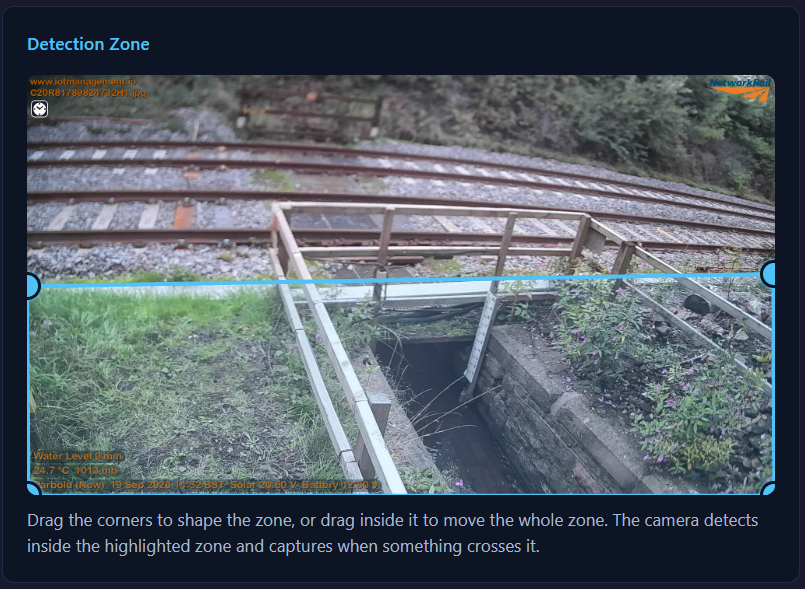
You draw a detection zone on the picture, so the camera watches the part of the scene that matters and ignores the rest. A road at the top of the frame, a footpath along one edge, trees that never stop moving in the wind — all of it can be left outside the zone. Every two seconds the camera compares the zone with how it looked at the last check, and measures how much of it has changed.
Movement has to persist to count. A single changed frame can be a glitch or a bird, so an event only fires when two consecutive checks both exceed your trigger level — the zone was still changing two seconds later, which means something is genuinely moving through it. That costs two seconds and removes most of what makes ordinary motion cameras unusable.
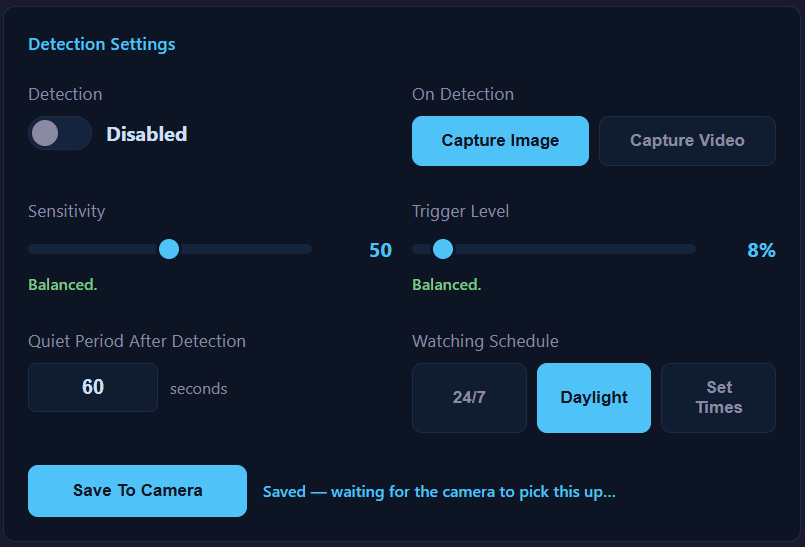
You set how much change counts. Sensitivity runs from 1 to 100, and the trigger level is the percentage of the zone that has to change before the camera takes an interest. A cooldown stops a single event filling your account with captures, and a daily schedule stops the camera watching at hours you do not care about.
When it fires, the camera captures — a still image or a video clip, whichever you have chosen — and uploads it marked as a detection, so it arrives in your portal separated from the routine pictures rather than buried among them.
Sudden changes in light are counted and reported separately. The camera is deliberately built to err towards capturing when the light changes rather than staying quiet: a needless picture costs you one capture, while an event that is never recorded is gone for good.
Motion detection – on board the camera, no server needed
Detection zone – drawn on the image, so only the area that matters is watched
Checks – every 2 seconds
Confirmation – movement must persist across two consecutive checks before an event fires
Sensitivity – adjustable, 1 to 100
Trigger level – the percentage of the zone that must change, adjustable
On trigger – capture a still image or a video clip
Cooldown – adjustable, one event per minute as standard
Schedule – daily start and stop times, 06:00 to 21:00 as standard
Light changes – counted separately from movement and reported
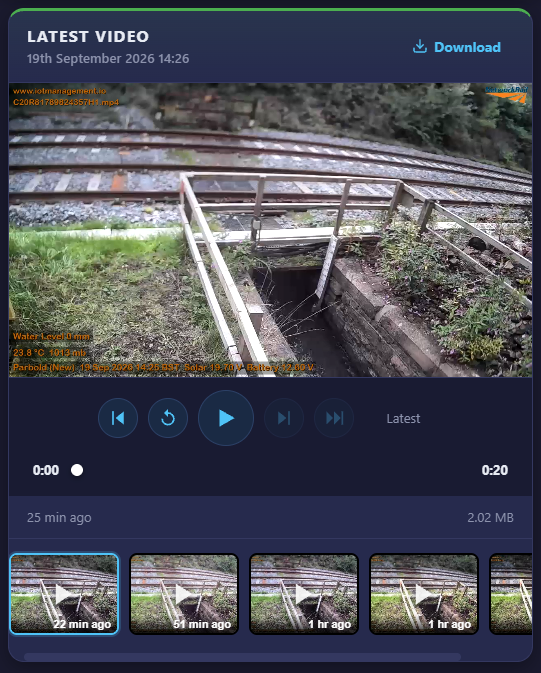
SEE IT LIVE
A fresh clip straight from the field, updated through the day — the camera spotting people and trains in live conditions.
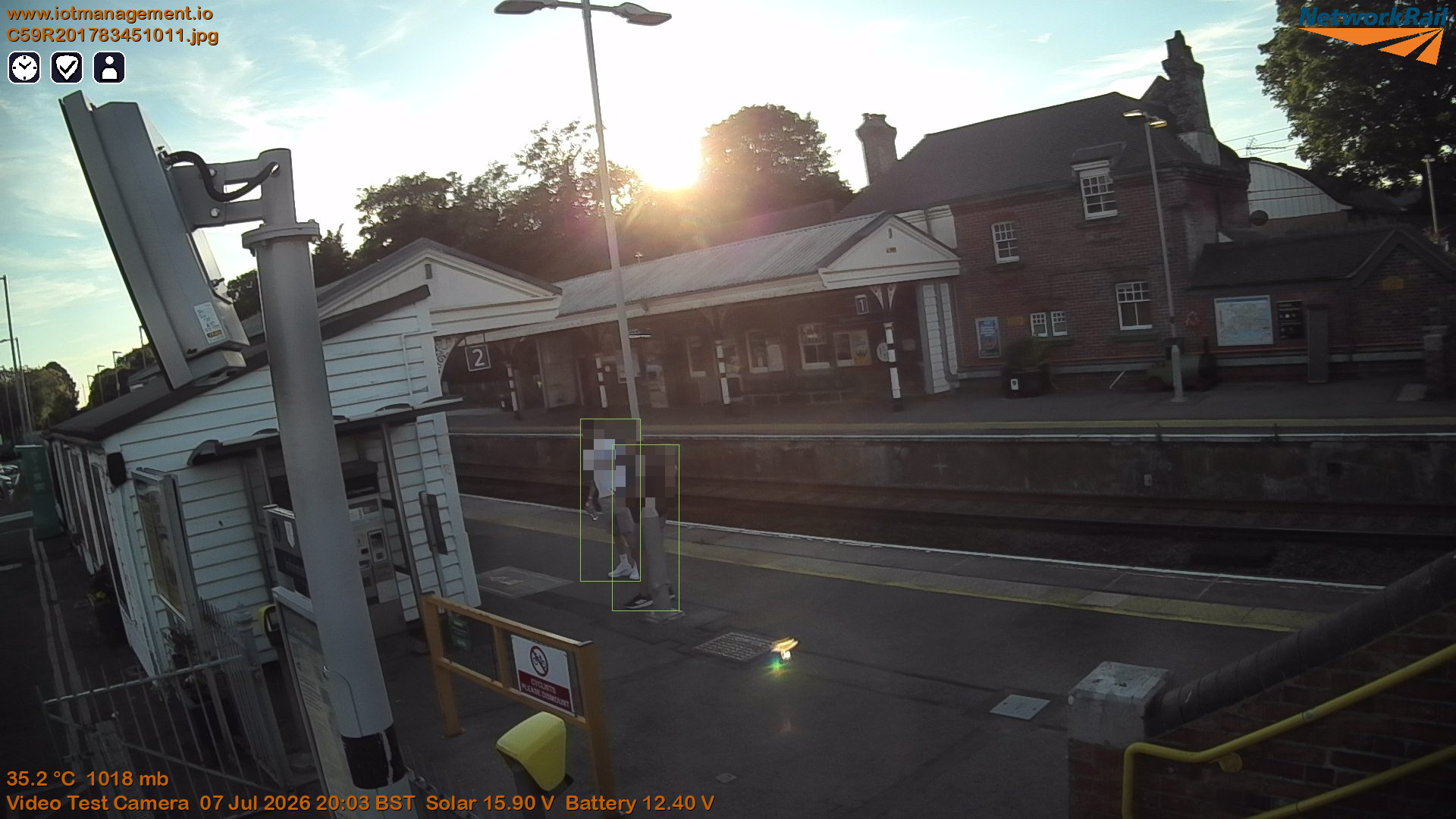
A live view from a camera out in the field, refreshing every few minutes — detecting people and trains automatically, and blurring every face as it goes.
SPECIFICATIONS
Imaging
Still image — 1920 × 1080 (Full HD)
Video — 1280 × 720 (HD), 20-second clips
Lens — distortion-free, 100° field of view; 4mm and 6mm options
Day — professional IR-cut lens for true colour
Low-light — starlight sensitivity down to 0.0001 lux — usable images in near-total darkness
Clarity — low-noise sensor holds detail where ordinary cameras show only grain
Dynamic range — up to 100dB HDR — streetlights, headlights and IR won't blow out the shot
Night — built-in infrared illumination — clear images in total darkness, even with no ambient light at all
Connectivity & On-Site
Mobile — multi-network 4G LTE, auto-connects to the strongest available UK network
Location — built-in GPS
On-site setup – built-in Wi-Fi hotspot, scan the code on the camera's screen to connect and open its pages
Sensors
Sensor port – one wired sensor, RS485 Modbus, powered by the camera
Supported – water level sensors, tipping bucket rain gauges, flow meters, weather stations
Setup – automatic detection at startup, nothing to configure
Reading interval – every 15 minutes as standard, adjustable down to 5
Water level – depth in millimetres, spike filtered and re-checked on a sudden change
Rainfall – totals for 15 minutes, 30 minutes, the hour and the day, to 0.1mm
Weather – wind speed and direction, temperature, humidity, barometric pressure, PM2.5, PM10
Alarms – high level, rapid rise, heavy rainfall
Wireless option – FloodEye Sensor Node by radio, typical range several kilometres in open terrain
Detection
Motion detection – on board the camera, no server needed
Detection zone – drawn on the image, so only the area that matters is watched
Checks – every 2 seconds
Confirmation – movement must persist across two consecutive checks before an event fires
Sensitivity – adjustable, 1 to 100
Trigger level – the percentage of the zone that must change, adjustable
On trigger – capture a still image or a video clip
Cooldown – adjustable, one event per minute as standard
Schedule – daily start and stop times, 06:00 to 21:00 as standard
Light changes – counted separately from movement and reported
Display
Screen – 1.69 inch full colour TFT, 240 × 280
Shows – identity, camera status, mobile signal, GPS, battery, solar, time and system status
Sensor readings – water level or rainfall shown live as the camera reads them
Setup – scan the code on screen to join the camera's network and open its pages
Wake – a button press brings the screen up
Capture
Standard image update — every 5 minutes
Video — a new clip every 15 minutes
Power
Battery — 432 Wh lithium
Solar panel — 30W monocrystalline
Running time — continuous, day and night
Build
Housing — weatherproof, IP68 rated
Updates — over the air
Always improving. The LTE Video Camera is in continuous development — new detection abilities and refinements are added regularly and delivered to cameras already in the field, over the air. Specifications may change as the platform evolves.